MethylBERT fine-tuning
Once the pure cell-type data is preprocessed following the previous tutorial, you can fine-tune the pre-trained MethylBERT model.
[1]:
from methylbert.utils import set_seed
import warnings
warnings.filterwarnings("ignore") # Ignore warnings for a clear notebook

set_seed(42)
seq_len=150
n_mers=3
batch_size=5
num_workers=20
output_path = "tmp/fine_tune/"
Load training and evaluation data
The preprocessed data must be loaded into the MethylBertFinetuneDataset and the pytorch DataLoader object.
You can change the number of workers and the batch size depending on the CPU/GPU resources you have. Please find more detailed explanation here.
[2]:
from torch.utils.data import DataLoader
from methylbert.data.vocab import MethylVocab
from methylbert.data.dataset import MethylBertFinetuneDataset

# Creat a look-up table
tokenizer = MethylVocab(n_mers)

# Load the data files int a data set object
train_dataset = MethylBertFinetuneDataset("tmp/train_seq.csv",
                                          tokenizer,
                                          seq_len=seq_len)
test_dataset = MethylBertFinetuneDataset("tmp/test_seq.csv",
                                         tokenizer,seq_len=seq_len)

# Load the data into a data loader
train_data_loader = DataLoader(train_dataset, batch_size= batch_size,
                               num_workers= num_workers, pin_memory=False,
                               shuffle=True)
test_data_loader = DataLoader(test_dataset, batch_size= batch_size,
                              num_workers= num_workers, pin_memory=True,
                              shuffle=False)
Building Vocab
Total number of sequences :  3052
# of reads in each label:  [1561. 1491.]
Total number of sequences :  763
# of reads in each label:  [383. 380.]
Create MethylBERT model
MethylBERT FinetuneTrainer gets the DataLoader objects and hyperparameters for the training as input.
[7]:
from methylbert.trainer import MethylBertFinetuneTrainer
import os

trainer = MethylBertFinetuneTrainer(len(tokenizer),
                      save_path=output_path,
                      train_dataloader=train_data_loader,
                      test_dataloader=test_data_loader,
                      lr=1e-4, with_cuda=False,
                      log_freq=1,
                      #eval_freq=10, #activate this only when you want to evaluate the model with test_data_loader
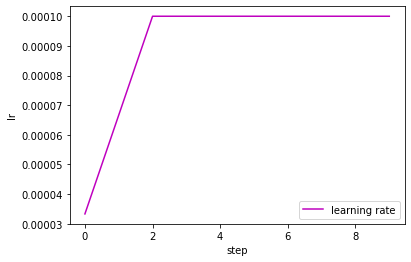
                      warmup_step=3)
The model is loaded on CPU
Load pre-training model from the uploaded models (huggingface.co/hanyangii/)
Pre-trained models with 2, 4, 6, 8, and 12 encoder blocks are available for MethylBERT. You can give an argument “hanyangii/methylbert_hg19_{number of encoder blocks}l” to the load function.
[12]:
trainer.load("hanyangii/methylbert_hg19_4l")
Restore the pretrained model hanyangii/methylbert_hg19_4l
Some weights of MethylBertEmbeddedDMR were not initialized from the model checkpoint at hanyangii/methylbert_hg19_4l and are newly initialized: ['dmr_encoder.0.weight', 'read_classifier.0.bias', 'read_classifier.0.weight', 'read_classifier.3.bias', 'read_classifier.3.weight', 'read_classifier.4.bias', 'read_classifier.4.weight']
You should probably TRAIN this model on a down-stream task to be able to use it for predictions and inference.
Total Parameters: 46929874
Load pre-training model from a local directory
If you have the pre-trained model saved in a directory containing config.json and pytorch_model.bin files
[8]:
ls ../test/data/pretrained_model/
config.json@ pytorch_model.bin@
You can directly load the model using load function to MethylBertFinetuneTrainer.
[9]:
trainer.load("../test/data/pretrained_model/")
Restore the pretrained model ../test/data/pretrained_model/
Total Parameters: 32754130
Train the MethylBERT model without pre-training
If you do not have a pre-trained MethylBERT model, you can create a new MethylBERT model from a configuration file. For example, the baseline BERT model config file can be downlaoded from from https://huggingface.co/bert-base-uncased/blob/main/config.json.
[6]:
cat ../test/data/config.json
{
  "architectures": [
    "BertForMaskedLM"
  ],
  "attention_probs_dropout_prob": 0.1,
  "gradient_checkpointing": false,
  "hidden_act": "gelu",
  "hidden_dropout_prob": 0.1,
  "hidden_size": 768,
  "initializer_range": 0.02,
  "intermediate_size": 3072,
  "layer_norm_eps": 1e-12,
  "max_position_embeddings": 512,
  "model_type": "bert",
  "num_attention_heads": 12,
  "num_hidden_layers": 12,
  "pad_token_id": 0,
  "position_embedding_type": "absolute",
  "transformers_version": "4.6.0.dev0",
  "type_vocab_size": 2,
  "use_cache": true,
  "vocab_size": 30522
}
Then create_model function of the trainer creates a new MethylBERT from the config file.
[7]:
trainer.create_model(config_file="../test/data/pretrained_model/config.json")
Total Parameters: 32754130
train function starts the training of MethylBERT model during the given number of steps.
[8]:
trainer.train(steps=10)
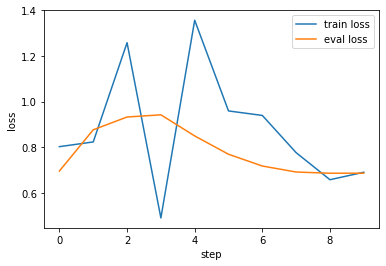
Train Step 0 iter - loss : 0.802449 / lr : 0.000033
Running time for iter = 0.6947791576385498
Step 0 loss (0.695615) is lower than the current min loss (inf). Save the model at tmp/fine_tune/
Step:0 Model Saved on: tmp/fine_tune/

Train Step 1 iter - loss : 0.823174 / lr : 0.000067
Running time for iter = 0.621410608291626

Train Step 2 iter - loss : 1.258267 / lr : 0.000100
Running time for iter = 0.5103580951690674

Train Step 3 iter - loss : 0.490022 / lr : 0.000100
Running time for iter = 0.5122716426849365

Train Step 4 iter - loss : 1.356685 / lr : 0.000100
Running time for iter = 0.5860369205474854

Train Step 5 iter - loss : 0.959048 / lr : 0.000100
Running time for iter = 0.6873147487640381

Train Step 6 iter - loss : 0.939311 / lr : 0.000100
Running time for iter = 0.4517858028411865

Train Step 7 iter - loss : 0.776077 / lr : 0.000100
Running time for iter = 0.6021583080291748
Step 7 loss (0.691268) is lower than the current min loss (0.695615). Save the model at tmp/fine_tune/
Step:7 Model Saved on: tmp/fine_tune/

Train Step 8 iter - loss : 0.657497 / lr : 0.000100
Running time for iter = 0.4712505340576172
Step 8 loss (0.685933) is lower than the current min loss (0.691268). Save the model at tmp/fine_tune/
Step:8 Model Saved on: tmp/fine_tune/

Train Step 9 iter - loss : 0.690212 / lr : 0.000100
Running time for iter = 0.4791133403778076
It creates six files in the given save_path:
config.jsonandpytorch_model.bin: model configuration and the trainedMethylBERTmodeldmr_encoder.pickle: The trained DMR encoder in the MethylBERT modelread_classification_model.pickle: The trained fully connected neural network for read classificationtrain.csvandeval.csv: tracked training and evaluation loss and accuracy values during the training
[9]:
ls tmp/fine_tune/
config.json         eval.csv           read_classification_model.pickle
dmr_encoder.pickle  pytorch_model.bin  train.csv
[10]:
import pandas as pd
df_train  = pd.read_csv("tmp/fine_tune/train.csv", sep="\t")
df_train.head()
[10]:
| step | loss | ctype_acc | lr | |
|---|---|---|---|---|
| 0 | 0 | 0.802449 | 0.2 | 0.000033 |
| 1 | 1 | 0.823174 | 0.0 | 0.000067 |
| 2 | 2 | 1.258267 | 0.2 | 0.000100 |
| 3 | 3 | 0.490022 | 0.8 | 0.000100 |
| 4 | 4 | 1.356685 | 0.2 | 0.000100 |
[11]:
df_eval  = pd.read_csv("tmp/fine_tune/eval.csv", sep="\t")
df_eval.head()
[11]:
| step | loss | ctype_acc | |
|---|---|---|---|
| 0 | 0 | 0.695615 | 0.522936 |
| 1 | 1 | 0.876368 | 0.501966 |
| 2 | 2 | 0.932430 | 0.501966 |
| 3 | 3 | 0.942029 | 0.501966 |
| 4 | 4 | 0.849511 | 0.501966 |
[14]:
import seaborn as sns
import matplotlib.pyplot as plt
sns.lineplot(data=df_train, x="step", y="loss", label="train loss")
sns.lineplot(data=df_eval, x="step", y="loss", label="eval loss")
plt.show()
[15]:
sns.lineplot(data=df_train, x="step", y="lr", label="learning rate", color="m")
plt.show()